

Why Is My Website Getting Impressions but No Clicks?
Seeing your Google impressions increase while clicks remain flat can be confusing.
It may look as though Google is showing your website prominently and customers are deliberately ignoring it. In reality, an impression does not always mean that your website appeared near the top of a conventional results page.
The problem usually comes down to one or more of the following:
Your pages are appearing too far down the results
Google is showing your website for unsuitable searches
The wrong page is appearing
Your title or search snippet is not persuasive
Several pages from your website are appearing for the same query
Google is testing newly indexed pages before deciding where they should rank
The correct solution depends on which of these is happening.
The Quick Answer
If your website receives impressions but few clicks, start by checking its average position.
A website appearing at position 50 will naturally receive very few clicks, even if it generates hundreds of impressions. That is principally a ranking problem.
A page consistently appearing within the top five but receiving no clicks needs a different investigation. Its title, search snippet, relevance or landing-page selection may be discouraging people from visiting.
Do not rewrite the entire website until you know which situation applies.
What Does an Impression Mean in Google Search Console?
Google Search Console records an impression when a link to your website is displayed within an eligible Google search result.
That does not necessarily mean:
The result appeared above the fold
The searcher noticed it
It was a conventional blue organic result
It was the only page from your website shown
It appeared in the same position on every device
The searcher was genuinely looking for your service
An impression confirms that Google considered your website relevant enough to display. It does not confirm that the result was prominent enough—or persuasive enough—to earn a click.
Is It a Ranking Problem or a Click-Through Problem?
Use average position as an initial diagnostic guide.
-
Investigate the title, snippet, search intent and selected landing page
-
Both ranking and click-through rate may need improvement
-
Primarily a ranking and authority problem
-
Google is testing or weakly associating the page with the search
These ranges are diagnostic guides, not fixed rules.
Search results vary by location, device, search features and individual query. Search Console also reports averages across many different impressions, so a position of five does not mean the same result appeared fifth every time.
Reason 1: Your Website Is Appearing Too Far Down the Results
This is the most common explanation for rising impressions without clicks.
Google may have discovered new service, location or article pages and started displaying them across a wider range of searches. Those pages might initially appear at positions 40, 60 or 80.
That creates a substantial increase in impressions without a corresponding increase in traffic.
This is still useful progress. Google cannot move a page from obscurity to page one without first crawling it, understanding it and testing its relevance.
However, those impressions should be treated as evidence of discovery—not evidence that the page is already ranking successfully.
What to do
Focus on improving:
Page relevance
Internal links
Service and location clarity
Useful supporting content
Reviews and trust signals
External mentions and links
Case studies and proof
Overall website authority
Changing the meta description will not solve a page sitting at position 70.
Reason 2: Google Is Showing You for the Wrong Searches
More impressions are not always more valuable.
A business charging £450 per month for professional SEO support may appear for searches such as:
Cheap SEO
£99 SEO packages
Free SEO services
Cheapest SEO company
Those searchers may deliberately choose not to click because the offer does not match their budget or expectations.
The website has technically gained visibility, but not from the right audience.
What to do
Review your Search Console queries and separate them into:
Commercially relevant searches
Informational searches
Low-budget or unsuitable searches
Branded searches
Location searches
Irrelevant or accidental searches
Do not damage your positioning by building the entire website around low-quality impressions.
It is often better to receive fewer visits from appropriate customers than hundreds of clicks from people who will never purchase the service.
Reason 3: Google Is Showing the Wrong Page
A general homepage may appear when a focused service or location page would be more useful.
For example, someone searching for “SEO services in Crawley” should ideally see a dedicated Crawley page—not a homepage covering every service, package, customer type and location.
When the wrong page appears, the search result may feel less relevant and receive fewer clicks.
This can happen when:
The intended page is new
The page is not sufficiently distinctive
Internal links are weak
Several pages target overlapping searches
The homepage carries most of the website’s authority
Google has not fully processed recent changes
How to check
In Google Search Console:
Open Performance → Search results
Select the Queries tab
Click the relevant search query
Open the Pages tab
Review which URLs Google displayed
If several pages appear for the same search, compare their impressions and average positions.
The solution may involve strengthening the intended page, improving internal links or reducing overlap—not automatically deleting pages.
Reason 4: Your Title or Search Snippet Is Not Earning the Click
If a relevant page consistently appears prominently but receives few clicks, examine how the result looks beside its competitors.
A weak result may:
Use a vague title
Omit the relevant service or location
Make no clear promise
Provide no evidence or differentiation
Display repetitive wording
Use a snippet that does not answer the search
Look less established than competing businesses
Compare:
SEO, Local Search and Digital Visibility Services
with:
SEO Services East Grinstead & Sussex | Clear Pricing
The second result communicates the service, location and a practical point of difference more quickly.
Google can create search snippets from the visible page content and may show different wording for different queries. Your meta description gives Google a useful option, but it does not control every snippet.
What to do
Make sure the page contains:
A concise, descriptive SEO title
One clear H1
An answer-first opening paragraph
Language that matches the intended search
Concrete services or outcomes
Evidence, pricing or another meaningful differentiator
A unique description that accurately summarises the page
Avoid changing titles every few days. Google needs time to recrawl the page and collect enough data for a useful comparison.
Reason 5: Search Console’s Average Position Looks Better Than Your Real Exposure
Search Console can aggregate results at property level or page level.
If several pages from one website appear for the same query, property-level reporting uses the highest-positioned result and counts the property once.
Individual page reporting can count each displayed URL separately.
This means:
Page-level impressions can exceed property-level impressions
A query’s reported position may reflect your highest result
Another page from the same website may appear much lower
A strong-looking property position may not describe the intended landing page
This is why query and page data should be examined together.
Average position is useful for understanding trends, but it should not be treated like a conventional rank-tracking result.
Reason 6: Some Clicked Queries Are Hidden
Google omits some individual queries from the Search Console table to protect user privacy.
These anonymised searches remain included in the totals shown in the main chart.
As a result, your report may show:
Clicks in the main chart
No clicks beside the visible queries
More total impressions than the query rows contain
The clicks have not disappeared. Google has simply withheld the searches that produced them.
Do not assume every click is missing or that the report is broken.
A Real Search Console Example
In a recent internal analysis, one website’s visibility increased from 968 impressions to 6,554.
At first glance, the click-through rate appeared to have deteriorated significantly.
A deeper review showed that:
Google had expanded from displaying three pages to testing 35 pages
The number of visible queries increased from 87 to 705
UK impressions increased substantially
88% of the new period’s impressions arrived during the final eight days
Those final eight days had an average position of approximately 61
The website had not suddenly become less appealing.
Google had started testing many newly indexed pages across hundreds of low-ranking searches. The falling CTR was mainly caused by the expanded ranking footprint.
The correct response was to strengthen the most promising pages and build authority—not repeatedly rewrite the homepage description.
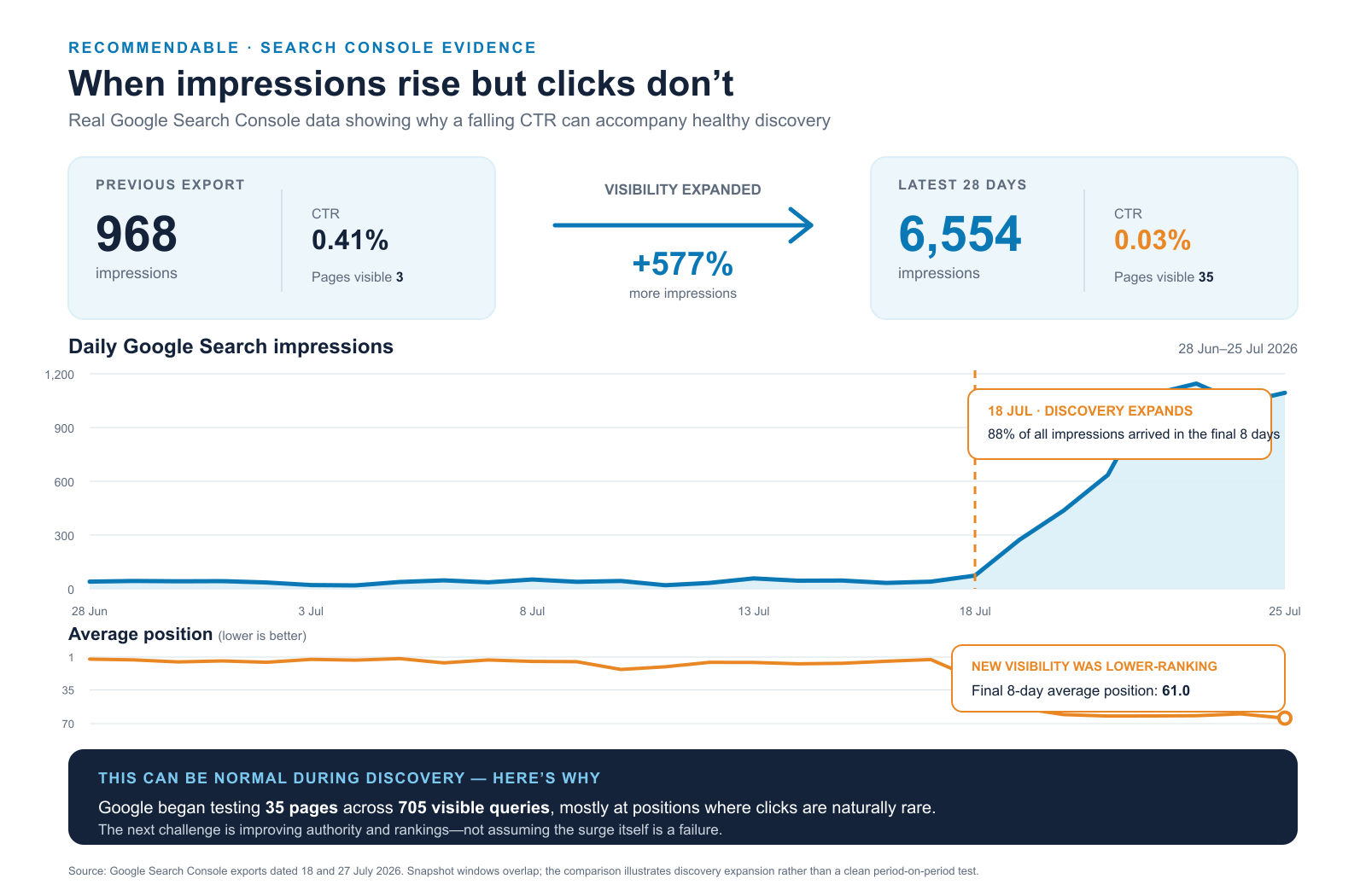
Google visibility expanded from 968 to 6,554 impressions as Google began testing more pages and queries. CTR fell because most of the additional exposure appeared at lower ranking positions, where clicks are naturally rare.
How to Diagnose Your Own No-Click Problem
Use this process before making changes.
-
Start with the last 28 days and compare it with the previous 28 days when enough data is available.
Avoid comparing a complete period with a partial one.
-
If you mainly serve UK customers, apply:
Country → United Kingdom
This prevents unsuitable overseas impressions from distorting your commercial assessment.
-
Identify which pages are receiving impressions, which have clicks and which are being tested at low positions.
Pay particular attention to:
Homepage
Main service pages
Priority location pages
Pricing pages
Case studies
Educational guides
-
Filter an individual page and open the Queries tab.
This reveals whether the page is appearing for the searches you intended.
-
A query at position 65 needs authority and relevance.
A commercially useful query at position four with no clicks needs a search-result and landing-page review.
-
Search manually, remembering that results can vary by person and location.
Compare:
Titles
Snippets
Reviews
Location signals
Pricing
Proof
Brand recognition
Search features surrounding the result
-
Change the element most likely to be responsible, then allow Google time to process it.
Do not alter the title, H1, description and entire page simultaneously unless the page genuinely requires rebuilding.
What Should You Fix First?
-
Prioritise:
Better content alignment
Internal links
Website authority
Reviews
External mentions
Relevant backlinks
Stronger supporting pages
-
Improve:
Search intent alignment
Page depth and usefulness
Titles and headings
Internal links
Supporting evidence
Authority
-
Review:
The displayed title and snippet
Whether the correct page appears
Competitor trust signals
Price and offer alignment
Search-result features
Whether the query is genuinely commercially relevant
-
Avoid reacting to low CTR by:
Rewriting the homepage every few days
Creating dozens of near-identical pages
Targeting every “cheap” search
Stuffing locations into titles and image descriptions
Deleting newly indexed pages before they have settled
Treating average position as a precise rank
Buying low-quality links
Assuming more words automatically create better rankings
Good SEO diagnosis identifies the actual constraint before prescribing the solution.
Could Your Website Be Getting the Wrong Kind of Visibility?
Recommendable’s SEO and Visibility Health Check examines:
Google Search Console performance
Queries and landing-page selection
Page titles and search descriptions
Website structure
Service and location targeting
Google Business Profile
Reviews and trust signals
Technical accessibility
Content gaps
AI search visibility
Priority opportunities for improvement
You receive a clear report explaining what is working, what is limiting clicks and which improvements should be prioritised.
Frequently Asked Questions
-
Yes. Impressions mean Google has discovered some relevance between your website and the searches being performed.
However, the quality of those impressions depends on the query, landing page and position. Impressions at position 70 are an early visibility signal, not a completed SEO result.
-
Search Console reports averaged and aggregated data. The position may relate to a search feature, a small number of appearances or the highest page from your property.
Check which page appeared, the device, country and exact search intent before assuming that a conventional first-position result was ignored.
-
Yes.
If Google starts showing your website across hundreds of new searches at lower positions, impressions can rise much faster than clicks. Your overall CTR can therefore fall even while your visibility footprint is expanding.
-
Some queries are anonymised to protect user privacy. Their clicks and impressions remain in the chart totals but are omitted from the visible query rows.
-
Only when the existing description is inaccurate, duplicated, unhelpful or poorly aligned with the page.
A new description may help Google create a better snippet, but it will not solve low rankings, weak authority or unsuitable search intent.
-
Google may process some updates within days, while others take several weeks.
Allow enough time for the page to be recrawled and collect meaningful impressions before judging the result. Avoid repeatedly changing the same metadata during that period.
-
Yes.
Recommendable can review the queries, pages, rankings, search presentation and website structure to establish whether the main issue is ranking, intent, landing-page selection or click-through appeal.